
TL;DR:
- Effective online parent engagement builds trust and involves two-way communication, not just sending updates. Schools should tailor their channels, foster relationships, and ensure accessibility to strengthen support for families and improve children’s learning outcomes. Using flexible, responsive strategies alongside dedicated platforms helps schools create genuine partnerships with parents.
Parents receiving a newsletter three days late. A vital welfare update buried under a flood of emails. A pupil struggling at home because their parents never knew what support was available. These are not rare scenarios; they play out in schools across the UK every week. Strategic online parent engagement is not a luxury feature for forward-thinking schools — it is a core responsibility that directly shapes how well children learn and how confidently families trust your institution. This guide gives you a structured, evidence-based approach to getting it right.
Table of Contents
- Defining effective online parent engagement
- Key steps for tailoring digital communication to parents
- Choosing and blending your channels: strategies and tools
- Ensuring accessibility, safety, and compliance
- Building confidence around online safety and digital parenting
- Why true online parent engagement must prioritise trust and flexibility
- How eSchools can help you engage parents online
- Frequently asked questions
Key Takeaways
| Point | Details |
|---|---|
| Prioritise tailored communication | Messages that suit your parental audience encourage real participation and better student outcomes. |
| Blend multiple digital channels | Using both one-way and two-way communication methods maximises reach and engagement. |
| Ensure accessibility for all | Provide alternatives, language support, and flexible options to involve every parent. |
| Prioritise online safety and compliance | Comply with UK laws and empower parents to support digital safety at home. |
| Build relationships, not just systems | Focus on trust, flexibility, and two-way dialogue for lasting parental support. |
Defining effective online parent engagement
Before you can improve something, you need to understand what it actually is. Many schools operate on a broadcast model: send information out, hope it lands. That is not engagement. It is notification.
The Education Endowment Foundation is clear on this distinction: schools should treat parental engagement as both a relationship-building task and a route to improving children’s home learning environment, not simply a channel for sending updates. That framing matters enormously. It shifts your school’s role from information supplier to active partner in a child’s education.
True online engagement has three dimensions:
- Information delivery: Sharing timetables, policies, events, and academic updates clearly and promptly.
- Dialogue and feedback: Creating structured opportunities for parents to respond, ask questions, and contribute their perspectives.
- Learning support: Providing resources and guidance that help parents actively support their child’s learning at home.
The gap between the first and third of these is significant. A school that only sends weekly emails is operating at a fraction of its potential impact. Explore these digital engagement tips to understand how communication can move from passive to participatory.
| Engagement level | What it looks like | Impact on outcomes |
|---|---|---|
| Transactional | One-way emails, letters home | Low |
| Informational | Newsletters, website updates | Moderate |
| Relational | Surveys, virtual meetings, two-way messaging | High |
| Partnership | Parents supporting home learning actively | Very high |
Well-designed website design strategies can move your school up this ladder by making information clearer, more accessible, and easier to act on.
Key steps for tailoring digital communication to parents
No two parent communities are identical. A secondary school in inner-city Birmingham faces very different communication needs to a rural primary school in Cumbria. Tailored communication is not just good practice — the EEF highlights that schools should use communication that encourages positive dialogue about learning and regularly review how well the school is working with parents.
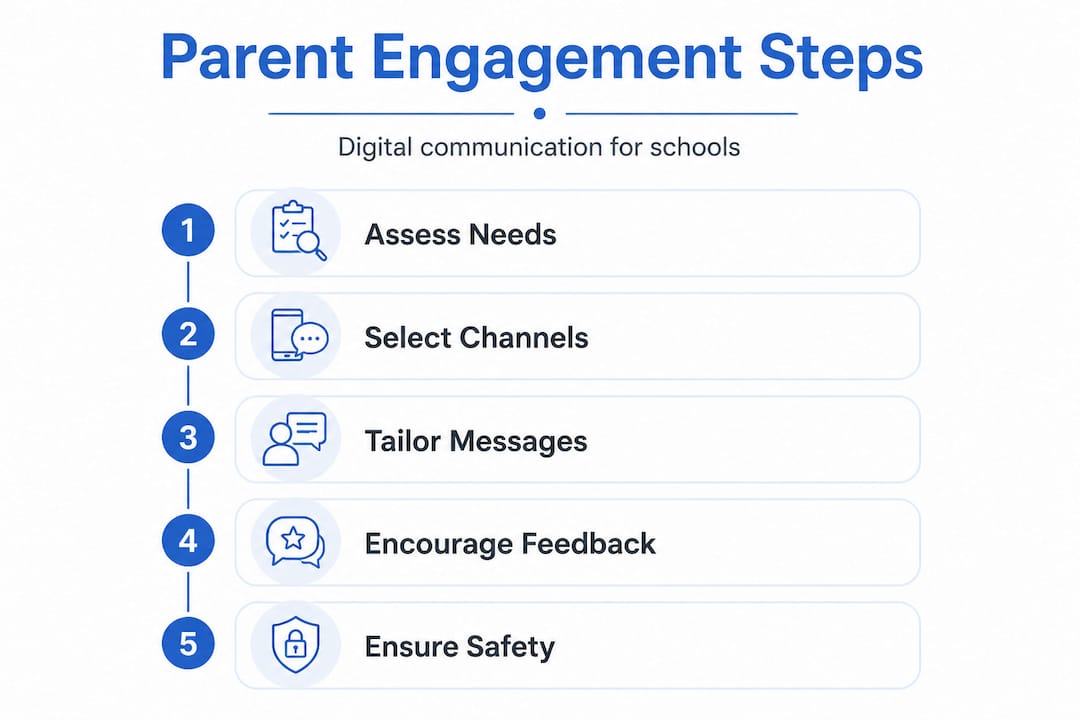
Here is a practical approach to tailoring your efforts:
-
Segment your parent cohorts. Identify groups with different needs: parents of SEND pupils, parents with English as an additional language (EAL), working parents with limited availability, and parents of children in transition years. Each group may need different timing, formats, or channels.
-
Make two-way communication routine. A termly survey is not enough. Build short feedback moments into your regular communications. After a virtual parents’ evening, send a two-question follow-up. After a key policy change, open a short Q&A thread. These micro-interactions build trust faster than any annual consultation.
-
Adapt tone and method for accessibility. Some parents prefer reading a detailed update; others respond better to a short video message from the headteacher. Consider translated summaries for EAL families. Think about whether your communications are mobile-friendly, since many parents access school information via smartphone rather than a desktop computer.
-
Review effectiveness on a set schedule. Set a half-termly review in your communication calendar. Look at open rates, message response rates, and attendance at virtual events. If engagement is declining, investigate why before the problem compounds.
Pro Tip: Pair a short annual parent communication survey with your Ofsted self-evaluation process. The data you gather not only helps you improve engagement, it also demonstrates active partnership to inspectors.
For MATs, improving MAT communication across multiple schools adds another layer of complexity. Central messaging must be consistent, yet individual schools still need room to personalise tone and format for their communities.
The growing role of educational apps in learning also means that parents increasingly expect school communications to integrate with the digital tools they already use daily. Meeting parents where they are, not where it is convenient for the school, is the operating principle here.
Choosing and blending your channels: strategies and tools
Choosing the right channel is not about picking the most popular technology. It is about matching the medium to the message and the audience. Government guidance on communicating mobile phone policies illustrates this well: effective schools mix one-way updates such as newsletters and emails with planned two-way touchpoints so that messages reach different parents and are reinforced throughout the year.
| Channel | Type | Strengths | Limitations |
|---|---|---|---|
| Email newsletter | One-way | Detailed, archivable | Low open rates, easy to ignore |
| School website | One-way | Always available, SEO-visible | Passive, parents must visit |
| Mobile app | Both | Push notifications, two-way messaging | Requires download and setup |
| Virtual meetings | Two-way | Builds relationship, flexible timing | Requires scheduling, tech confidence |
| Online forums | Two-way | Ongoing dialogue, community-building | Can be difficult to moderate |
| SMS / text | One-way | High open rates, immediate | Character limits, no rich content |
The sweet spot for most UK schools is a blended approach. Consider this practical model:
- Use your school website as the single source of truth for policies, key documents, and event information.
- Use email or app notifications to alert parents to new content or urgent updates.
- Use virtual meetings or webinars at key points in the year (start of term, SATs preparation, transition events).
- Use two-way messaging via an app for pastoral or individual communications.
The eSchools mobile app is designed precisely for this kind of blended model, giving schools push notification capability, two-way messaging, and document sharing in one place.
Pro Tip: Do not launch every channel at once. Pick two or three that suit your community, embed them well, then expand. A school that uses one channel consistently outperforms a school that uses five channels poorly.
Looking at the real impact of a structured engagement process shows that consistency and clarity in channel use correlates directly with improved parental confidence. And when you look at better outcomes from digital engagement, the evidence points consistently to schools that blend channels thoughtfully rather than relying on a single platform.
Ensuring accessibility, safety, and compliance
Even the most carefully designed communication strategy will fail if it excludes families or falls foul of data protection law. Accessibility and compliance are not afterthoughts; they are structural requirements.

Education Support advises schools to plan online engagement so it is accessible and responsive: provide alternative participation methods including virtual meetings and forums, avoid assumptions about parents’ digital confidence, and include interpreters where needed.
Key principles to embed in your approach:
- Offer alternatives. Not every parent can attend a virtual meeting. Record sessions and share them. Provide written summaries. Allow questions to be submitted in advance or by email.
- Support language diversity. Use translation tools where possible. For significant communications (annual reports, safeguarding policies), offer translated versions for your most common EAL languages.
- Audit for device compatibility. Ensure your website and communications render correctly on mobile devices and older operating systems. Many disadvantaged families access the internet exclusively via smartphone.
- Involve the right people internally. Your DSL (Designated Safeguarding Lead), SENCo, IT coordinator, and communications lead should all have input into your engagement policy. This is not a task for one person to manage alone.
On data protection, UK GDPR and Data Protection Act compliance requires that schools protect personal data and maintain clear processes to prevent and respond to breaches. This applies directly to how you store parent contact details, how you manage messaging platforms, and how you handle consent for digital communications.
Common compliance mistakes to avoid:
- Using personal email accounts or consumer messaging apps (such as WhatsApp) for official school communications.
- Storing parent contact data in unsecured spreadsheets.
- Failing to obtain clear consent before sending marketing-style content.
- Not having a documented breach response procedure.
Switching to a dedicated platform can help you reduce SMS costs while keeping all communications within a compliant, secure environment. That is a practical win on both the financial and legal fronts.
Building confidence around online safety and digital parenting
Online safety is an area where many schools communicate at parents rather than with them. A letter home about screen time limits or a PDF about social media risks may tick a governance box, but it rarely changes behaviour or builds confidence.
NSPCC Learning is explicit about this: when schools engage parents on online safety, they should share helpful resources and sessions, and frame e-safety as being about parenting and communication skills rather than technology. That reframing is powerful. Parents who feel judged or overwhelmed by technical language will disengage. Parents who feel supported as modern parents in a connected world will lean in.
Here is a structured approach to building that confidence:
-
Run or curate e-safety sessions. These do not need to be school-produced. Partner with organisations such as Internet Matters, the NSPCC, or local authority advisers to deliver accessible workshops. Offer both in-person and virtual options.
-
Use your school website as a safety hub. Create a dedicated parent page with curated resources, age-appropriate guidance by year group, and links to trusted organisations. Update it each term.
-
Involve parents in policy conversations. When reviewing your online safety or acceptable use policy, invite parent representatives to contribute. People who help shape a policy are more likely to support and reinforce it at home.
-
Frame digital parenting positively. Rather than focusing on risks alone, share content about positive digital habits, creative uses of technology, and how improving the online learning experience at school connects with healthy digital use at home.
Resources on building STEAM confidence through safe digital environments demonstrate that positive framing consistently produces more engaged, confident families than risk-only messaging.
Why true online parent engagement must prioritise trust and flexibility
Here is an honest observation from working with schools across the UK: the institutions that struggle most with parental engagement are not the ones with the worst technology. They are the ones with the most rigid approach to using it.
There is a pattern that repeats itself. A school invests in a new communication platform, sends a flurry of messages in September, and expects engagement to follow automatically. When it does not, the conclusion is that “parents just do not respond.” But the real issue is almost always a lack of adaptability and genuine two-way intention.
Real engagement transformation happens when schools treat their communication strategy as a living process, not a fixed system. That means reviewing what is working, responding when parents signal frustration or confusion, and being willing to change format, timing, or tone based on what the data and feedback tell you.
Trust is the invisible infrastructure beneath every successful engagement strategy. Parents who trust that the school will listen, respond promptly, and treat their concerns seriously are far more likely to engage online. That trust is built in small, consistent moments: a reply to a message that comes within a day, a survey where the results are shared back with the community, a virtual meeting where the headteacher stays on for twenty minutes of open questions.
Policy compliance and data protection are necessary. Accessible technology is necessary. But neither is sufficient. The schools that genuinely thrive with online parent engagement prioritise the human elements: flexibility, responsiveness, and the steady, visible effort to treat families as partners rather than recipients. That is the mindset shift that separates effective engagement from effective administration.
How eSchools can help you engage parents online
Implementing everything in this guide requires the right foundations, and that is where eSchools can make a significant difference for your school or trust.

With over 14 years of experience supporting UK schools, eSchools offers a suite of tools designed specifically for the challenges outlined here. From bespoke school websites built for accessibility and compliance, to the parental engagement mobile app that brings two-way communication, push notifications, and document sharing into one secure platform, every solution is built with school leaders in mind. Explore our work with schools to see how we have helped institutions like yours build stronger, more trusted relationships with their parent communities. Talk to our team today to find the right starting point for your school.
Frequently asked questions
What are the core elements of effective online parent engagement?
Effective online engagement combines clear, two-way communication, accessibility, and activities that support learning at home. The EEF defines parental engagement as involving parents in supporting children’s academic learning, with communication tailored to encourage positive dialogue rather than simply delivering information.
How do we ensure all parents can access online communications?
Offer alternative formats, allow for language or digital support, and use interpreters where needed. Education Support advises against making assumptions about parents’ digital experience and recommends offering virtual meetings or online forums as alternative participation routes.
What role does online safety play in engaging parents?
It is vital for schools to involve parents with resources and training, framing e-safety as part of digital parenting and communication rather than a purely technical subject. NSPCC Learning notes that e-safety can feel daunting for parents and is best positioned as a conversation about modern parenting skills.
What should UK schools do to stay compliant with online parent communication?
Schools must follow UK GDPR and Data Protection Act rules, protect personal data, and maintain documented breach response processes. DfE guidance covers how schools and academies must protect personal data and comply with the Data Protection Act 2018.