
Online assessment is reshaping how UK schools evaluate students, and it goes far beyond swapping paper for screens. Digital evaluations use computers, laptops, and tablets to deliver everything from quick formative checks to end-of-year summative tests, with automated grading and real-time analytics built in. For school leaders and administrators, the implications stretch across workload, student engagement, fairness, and regulatory compliance. This guide covers the types of online assessment, the genuine benefits, the risks you cannot ignore, and the practical steps to implement it well in your school.
Table of Contents
- Defining online assessment in UK schools
- Benefits of online assessment for schools and students
- Challenges and risks: digital divide, fairness, and mode effects
- Implementing online assessment: practical steps for UK schools
- Connect with digital assessment solutions for your school
- Frequently asked questions
Key Takeaways
| Point | Details |
|---|---|
| Clear digital assessment types | Formative, summative, and self/peer methodologies shape online assessment frameworks. |
| Efficiency and engagement gains | Automated grading, real-time feedback, and improved authenticity boost student outcomes. |
| Digital divide and fairness issues | Access, support, and regulated rollout are crucial for equitable online assessment deployment. |
| Hybrid approaches recommended | Combine digital and paper strategies, especially for high-stakes exams and SEND/EAL support. |
| Practical step-by-step adoption | Piloting formative tools, benchmarking, and integrating with school MIS ensure effective implementation. |
Defining online assessment in UK schools
Online assessment, sometimes called on-screen assessment (OSA), refers to any evaluation delivered and responded to via a digital device. It is not simply a digitised version of a paper test. Platforms can incorporate multimedia questions, adaptive difficulty, instant feedback, and detailed analytics that paper simply cannot match.
Online assessments deliver both formative and summative evaluations through automated grading and analytics. Understanding the distinction between these two types is essential before choosing any platform.
Formative vs summative assessment at a glance:
| Type | Purpose | Frequency | Examples |
|---|---|---|---|
| Formative | Monitor learning in progress | Ongoing | Quizzes, polls, exit tickets |
| Summative | Measure achievement at end point | Termly or annually | End-of-unit tests, mock exams |
| Diagnostic | Identify gaps before teaching | Start of term | Baseline tests, screeners |
Beyond these two categories, assessment methodologies distinguish three approaches: Assessment for Learning (supporting progress during teaching), Assessment of Learning (measuring outcomes after teaching), and Assessment as Learning (students evaluating their own understanding). Each serves a different purpose, and the best digital platforms support all three.
Key features to look for in an online assessment platform include:
- Automated grading with rubric support for open-ended responses
- Real-time dashboards showing class and individual performance
- Adaptive questioning that adjusts difficulty based on student responses
- Integration with your MIS (management information system) for seamless data flow
- Accessibility settings for SEND and EAL learners
For a broader view of how assessment fits within your digital toolkit, explore the types of digital classroom tools available to UK schools today.
Benefits of online assessment for schools and students
The efficiency argument alone is compelling. Teachers spend significant time marking, recording, and reporting. Online platforms automate much of this, freeing staff to focus on teaching rather than administration.

AI and formative tools can reduce marking workload by up to 90% and deliver frequent feedback, with studies showing 20 to 30% learning gains for students. That is a substantial return on a relatively modest investment in platform licences.
Comparison: traditional vs online assessment workload
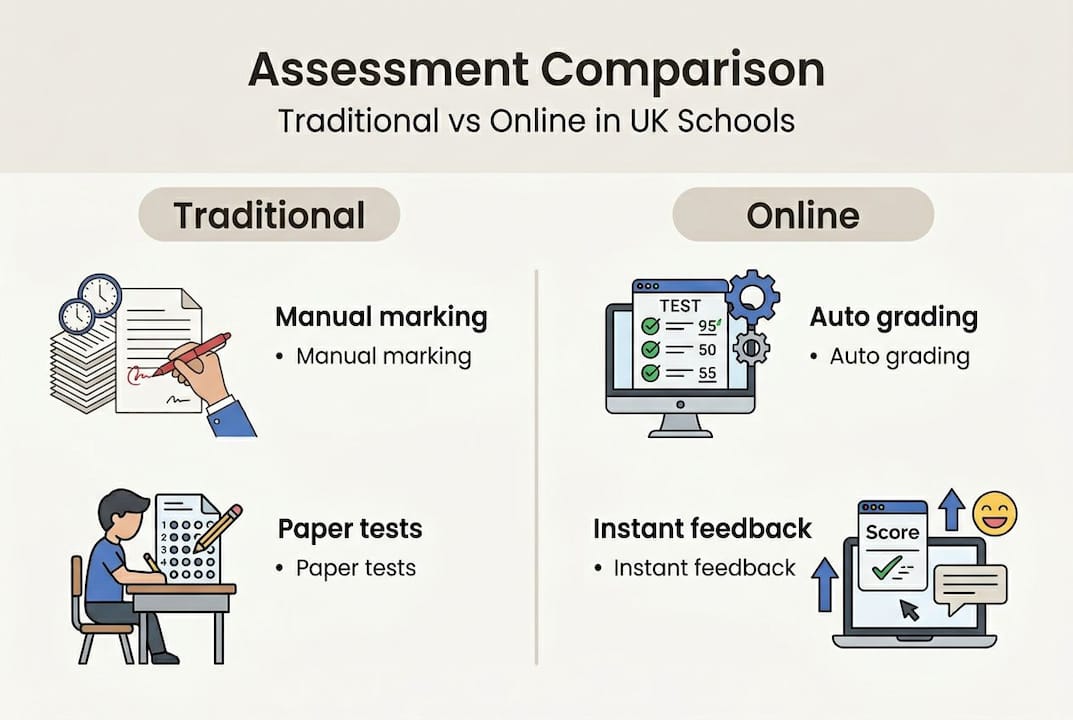
| Task | Traditional approach | Online approach |
|---|---|---|
| Marking a class set | 2 to 4 hours manually | Instant automated results |
| Generating progress reports | Half a day per term | Real-time dashboard exports |
| Identifying struggling pupils | Weekly review meetings | Automated alerts and flags |
| Sharing results with parents | Letters or parents’ evening | Instant digital notifications |
Student engagement is another strong argument. Many pupils, particularly older secondary students, are more comfortable typing than writing by hand. Interactive formats, including drag-and-drop, video-response, and scenario-based questions, make assessments feel less like a test and more like a task worth completing.
“Authentic assessment through digital tools allows students to demonstrate understanding in ways that reflect real-world skills, not just recall under exam conditions.” This shift matters enormously for subjects like design, media, and computing.
Proponents highlight efficiency, authenticity, and engagement as core benefits, though critics note fairness risks, mode effects, the digital divide, and over-reliance on AI as genuine concerns worth addressing.
For schools looking to reduce administrative burden across the board, edtech efficiency solutions offer a useful starting point for identifying where technology adds the most value.
National benchmarking tools such as MERiT and Edurio allow schools to compare their assessment data against regional and national averages, giving leadership teams a clearer picture of where they stand. This kind of contextualised data is far harder to generate from paper-based systems.
Pro Tip: Start any online assessment rollout with low-stakes formative tools. Build staff confidence and gather data before moving to high-stakes or summative digital assessments. This reduces risk and increases buy-in from your teaching team.
For schools focused on improving online learning, integrating assessment directly into your learning platform creates a seamless experience for both teachers and pupils.
Challenges and risks: digital divide, fairness, and mode effects
Online assessment is not without its complications. Before scaling any digital assessment programme, school leaders need to understand the risks clearly.
The digital divide is real. Unequal device access affects roughly 33% of students, and mode effects can make online assessment more cognitively demanding for some pupils than its paper equivalent. A student who struggles with typing, or who shares a device at home, is at an immediate disadvantage.
Key risks to address before implementation:
- Device access: Not all pupils have reliable access to suitable devices at home or school
- Mode effects: Some students perform differently on screen compared to paper, regardless of ability
- SEND and EAL learners: Digital formats can help with accessibility tools, but poorly designed platforms can create new barriers
- AI over-reliance: Automated marking can miss nuance in written responses, particularly for creative or analytical tasks
- Data security: Storing student assessment data digitally requires robust GDPR compliance
“Without deliberate action to close the access gap, digital assessment risks widening the attainment gap rather than narrowing it.” This is a warning that school leaders must take seriously when planning any rollout.
Ofqual regulates the controlled rollout of on-screen assessment for high-stakes qualifications, currently prioritising paper-based exams for GCSEs and A-levels while permitting carefully managed pilots. This means your school has flexibility for internal assessments but must follow strict guidance for regulated qualifications.
Pro Tip: If device access is uneven across your school, consider a BYOD (bring your own device) policy or a targeted infrastructure investment plan. Audit your current device-to-pupil ratio before committing to any digital assessment programme.
For schools navigating the regulatory landscape, staying current with edtech support guidance is essential. You can also use the DfE Tracker to monitor policy updates relevant to your school, and ensure your school website compliance is up to date as digital requirements evolve.
Implementing online assessment: practical steps for UK schools
A structured approach makes the difference between a successful rollout and a costly false start. Here is a practical framework for UK school leaders.
- Audit your infrastructure. Check device-to-pupil ratios, broadband reliability, and staff digital confidence before selecting any platform.
- Define your assessment goals. Are you targeting formative feedback, summative reporting, or national benchmarking? Your goal shapes your tool choice.
- Select a platform integrated with your MIS. Tools integrated with MIS such as SIMS enable seamless tracking and reduce double-entry of data across systems.
- Launch a formative pilot first. Choose one year group or subject and run low-stakes digital assessments for a half-term before expanding.
- Train your staff properly. A platform is only as good as the people using it. Invest in CPD (continuing professional development) sessions before and after launch.
- Benchmark nationally. Use MERiT or Edurio to contextualise your results against comparable schools.
- Review and adjust. After each assessment cycle, analyse mode effects and gather pupil and staff feedback before scaling further.
Regulate high-stakes OSA cautiously and monitor mode effects carefully before extending digital assessment to regulated qualifications.
Tool selection guide by assessment type:
| Assessment type | Recommended approach | Key consideration |
|---|---|---|
| Formative (daily/weekly) | AI-powered quiz tools | Speed and feedback quality |
| Summative (end of unit) | MIS-integrated platforms | Data accuracy and reporting |
| High-stakes (regulated) | Hybrid human and AI marking | Ofqual compliance |
| Benchmarking | MERiT or Edurio | National comparability |
Pro Tip: Monitor mode effects by running parallel paper and digital versions of the same assessment with a small cohort. If results diverge significantly, investigate before committing fully to digital for that subject or year group.
For schools building a broader digital learning environment, the eSchools learning platform integrates assessment tools with online learning resources in one place. And if you are looking to improve communication around assessment results, the parents evening system makes it straightforward to share progress with families.
Connect with digital assessment solutions for your school
Moving from strategy to action is where many schools stall. The right platform and the right support make all the difference between a pilot that fizzles and a programme that genuinely improves outcomes.

eSchools has supported UK schools and multi-academy trusts for over 14 years, providing simple, effective digital tools that reduce workload and improve engagement. Whether you are exploring your first formative assessment tool or looking to build a fully integrated digital learning environment, our learning platform is designed to fit your school’s needs without unnecessary complexity. Browse our school digital assessment case studies to see how schools like yours have made the transition successfully. For practical guidance on building your digital classroom, our resource on online classroom tools is a strong next step.
Frequently asked questions
How do online assessments differ from paper-based tests?
Online assessments provide formative feedback and analytics that extend well beyond what paper can offer, including adaptive questioning, multimedia formats, and instant results. They are fundamentally different tools, not just digital replicas of traditional tests.
Are online assessments suitable for high-stakes exams like GCSEs?
Ofqual currently prioritises paper for high-stakes qualifications such as GCSEs and A-levels, though carefully managed pilots and hybrid approaches are permitted. Schools should follow Ofqual guidance closely before introducing digital formats for regulated assessments.
What is the biggest challenge for schools adopting online assessment?
Access remains uneven, with around 67% of students using digital tools regularly but device availability still inconsistent across schools. Mode effects and fairness concerns for disadvantaged pupils add further complexity to any rollout.
How accurate is AI marking for online assessments?
AI marking achieves around 90% accuracy for formative grading tasks, but human oversight remains essential for summative and high-stakes assessments where nuance and context matter most.
How can UK schools benchmark digital assessment progress?
MERiT and Edurio provide national comparison data and reporting tools that allow schools to measure their digital assessment outcomes against comparable institutions across England.