
TL;DR:
- Poorly designed edtech increases workload and hampers staff and pupil engagement.
- User-friendly technology improves efficiency, reduces costs, and promotes better learning outcomes.
- Usability and ongoing support are critical for successful edtech adoption and long-term impact.
Not all education technology is created equal. Schools across the UK are investing in digital tools at a record pace, yet many are quietly haemorrhaging time, budget, and staff motivation because the platforms they chose were simply too complicated to use well. Poor interface design is not a minor inconvenience; it is a strategic liability. This guide examines what genuinely user-friendly edtech looks like in practice, why it matters for your school’s operational efficiency, and how you can make smarter procurement decisions that deliver real, measurable impact for staff, pupils, and parents alike.
Table of Contents
- The true cost of poor edtech design
- How usability drives efficiency and reduces workload
- Supporting staff digital confidence and uptake
- How user experience shapes pupil engagement and outcomes
- A fresh perspective: The unseen power of simplicity in school technology
- Unlock better outcomes with user-friendly edtech
- Frequently asked questions
Key Takeaways
| Point | Details |
|---|---|
| Usability saves time | Choosing user-friendly edtech can save staff up to four hours per week through streamlined processes. |
| Staff confidence is key | Training and intuitive design are crucial to ensure all staff embrace and use new technology. |
| Good UX boosts engagement | Well-designed platforms increase pupil motivation and protect privacy, supporting better learning outcomes. |
| Fewer tools yield better results | Consolidating to simple, integrated systems delivers more strategic value than juggling multiple complex tools. |
The true cost of poor edtech design
It is tempting to judge a new platform by its feature list. The more it can do, the better the investment, right? Not quite. When a tool is confusing to navigate, staff stop using it fully, workarounds multiply, and the original problem remains unsolved. Worse still, the school has already paid for the licence.
The evidence is striking. 85% of Oak users reported a positive workload impact, with a median saving of four hours per week, directly because the platform was designed to fit real teaching workflows. That figure tells you something important: user-friendly edtech reduces teacher workload not as a side effect, but as a deliberate outcome of good design.
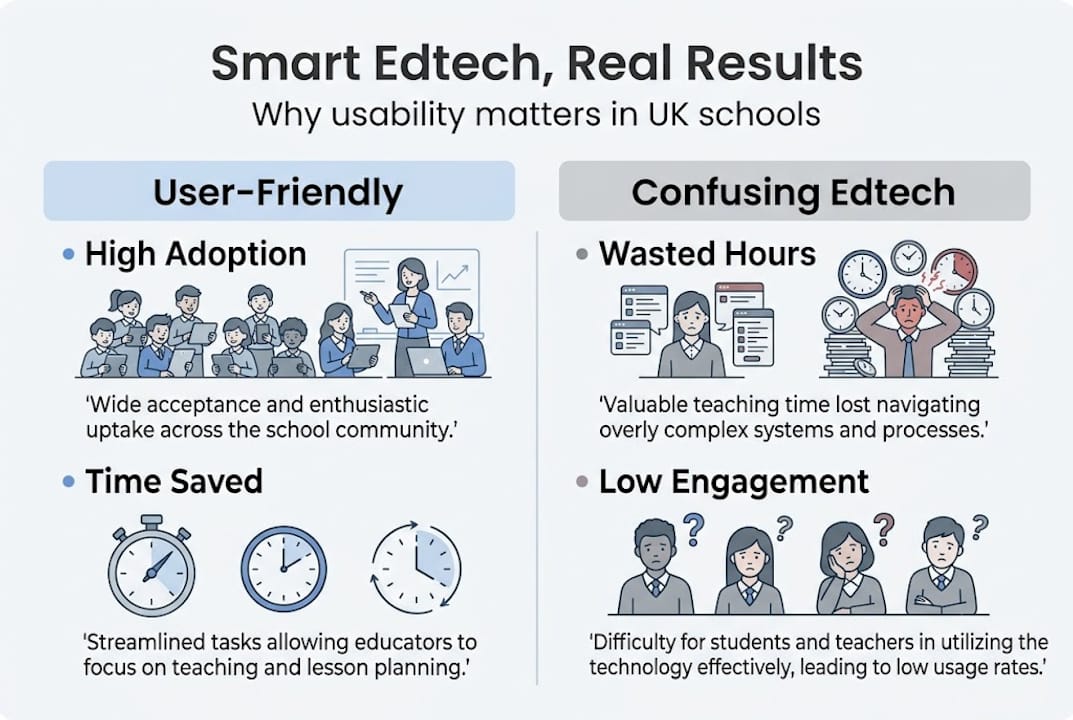
Contrast that with the experience many schools have when they adopt tools without piloting them properly. Staff spend time clicking through menus rather than teaching. Administrators duplicate data entry across systems. IT coordinators field the same support queries week after week. These are hidden costs that never appear on a procurement spreadsheet.
Consider this quick comparison of what user-friendly versus confusing edtech typically produces:
| Factor | User-friendly edtech | Confusing edtech |
|---|---|---|
| Staff adoption rate | High and sustained | Low, often abandoned |
| Time spent on admin | Reduced significantly | Increased or unchanged |
| Support queries | Minimal after launch | Frequent and recurring |
| Return on investment | Clear and measurable | Difficult to demonstrate |
| Staff morale | Positive | Negative or neutral |
The impact extends beyond individual classrooms. When exploring edtech solutions that improve efficiency, a consistent theme emerges: schools that prioritise usability over novelty see faster adoption and stronger outcomes. Poor design, by contrast, creates a cycle of frustration that undermines even the most well-intentioned digital strategy.
Key warning signs that your current tools may be working against you:
- Staff regularly revert to paper-based alternatives
- Training sessions need repeating every term
- Different departments use different versions of the same process
- Pupils or parents report confusion when accessing platforms
Pro Tip: Before committing to any new platform, run a structured pilot with a small, representative group of end users, including less digitally confident staff. Their experience will reveal usability issues that a product demo never will.
The lesson here is straightforward. Technology that staff cannot use confidently is not an asset; it is overhead. Scrutinise usability as rigorously as you scrutinise features, and you will make far better procurement decisions.
How usability drives efficiency and reduces workload
Once you accept that design quality directly affects outcomes, the next question becomes: what does the efficiency gain actually look like in practice? The answer, for many UK schools, is substantial.
At a national level, AI admin savings of ~£1bn have been projected across UK schools when smart, user-friendly digital tools are adopted at scale. That is not a theoretical figure; it reflects the cumulative time saved when administrative tasks are automated or simplified through well-designed platforms. LEO Academy Trust recorded a 23% efficiency gain after making deliberate, user-centred technology choices, a result that translated directly into more time for strategic leadership and pupil support.
The case for consolidation is equally compelling. Schools that replace a patchwork of third-party apps with a single, well-integrated management information system consistently report cost reductions and fewer operational headaches. Trinitas Multi-Academy Trust is one example, having moved away from multiple disconnected tools in favour of a consolidated platform, reducing both licensing costs and the cognitive load on staff.
Sadly, 94% of school leaders report that administrative burden actively hinders their ability to focus on strategic priorities. That is not a staffing problem; it is largely a design problem. When platforms require excessive manual input, cross-referencing, or workarounds, they consume exactly the time that leaders need for improvement planning.
If you are ready to move towards time-saving edtech platforms, a phased approach works best:
- Identify bottlenecks by mapping where staff time is most frequently lost in administrative processes.
- Pilot with end users before full rollout, gathering structured feedback on usability rather than just functionality.
- Phase the rollout to allow staff to build confidence incrementally, rather than switching everything at once.
- Review regularly to ensure adoption is sustained and new features are actually being used.
- Measure outcomes against clear benchmarks, such as time saved per week or reduction in support queries.
Pro Tip: Efficiency is only fully realised when every member of staff is confident using every feature they need. Pair strong platform design with ongoing, accessible support, and you will see adoption rates that actually hold.
The message for school leaders is clear. Usability is not a luxury consideration; it is the mechanism through which efficiency gains are actually delivered.
Supporting staff digital confidence and uptake
Even the most thoughtfully designed platform will underperform if staff do not feel confident using it. Digital confidence among teachers and administrators is one of the most underestimated variables in edtech success.
The DfE’s 2024 to 2025 survey found that 61% of school leaders believe technology reduces workload when it is well implemented. The critical phrase there is well implemented. The same survey highlights that skills gaps and insufficient training consistently limit the real-world impact of even well-designed tools. Infrastructure investment without attention to user confidence simply does not deliver.
The reality is that in most schools, at least a fifth of staff will resist or significantly underuse new technology if it feels unfamiliar or overwhelming. This is not stubbornness; it is a rational response to tools that were not introduced with adequate support.
Factors that boost digital confidence and uptake:
- Intuitive interface design that minimises the number of steps required for common tasks
- Role-specific training tailored to how different staff actually use the platform
- Leadership modelling, where senior staff visibly and confidently use the tools themselves
- Clear impact reporting that shows staff how the technology is saving them time
- Accessible ongoing support, not just a one-off training session at launch
Factors that block uptake:
- Overly complex onboarding with no follow-up
- Tools that require significant manual workarounds
- Lack of visible leadership buy-in
- No mechanism for staff to flag usability issues
The DfE is clear that design quality is as important as infrastructure. A fast broadband connection means nothing if the platform staff are asked to use is confusing and poorly structured. Investing in effective edtech support alongside the technology itself is what separates a successful rollout from an expensive disappointment.
Practical strategies that work include leading with your most confident adopters, using them as internal champions who can support colleagues informally. Walk-throughs should be revisited after the initial launch period, once staff have encountered real-world friction points. And better digital engagement strategies at the whole-school level make it far easier to bring hesitant staff along with confidence.
How user experience shapes pupil engagement and outcomes
Staff experience is only half the picture. The other half belongs to your pupils, and here the stakes are arguably even higher.

Children are remarkably perceptive about technology. They spot poor design instantly, and when a platform feels clunky, confusing, or invasive, their motivation drops sharply. Research from the London School of Economics found that pupils report poor UX as a genuine barrier to engagement, citing intimidating monitoring features, confusing gamification mechanics, and navigation that feels designed for adults rather than learners.
This matters because engagement is a prerequisite for learning. A platform that a pupil finds stressful or confusing will not support their progress, regardless of how educationally sound its content might be.
Common UX issues that undermine pupil engagement:
- Confusing navigation with too many clicks to reach core tasks
- Overbearing monitoring or surveillance features that feel punitive
- Gamification that rewards speed over understanding, creating anxiety
- Poor accessibility for pupils with ADHD, EAL needs, or SEND requirements
- Inconsistent visual design that makes it hard to build familiarity
What genuinely motivates pupils in a digital learning environment:
- Simplicity and clarity so they can focus on the task, not the tool
- Fair reward systems that recognise effort and progress, not just speed
- Privacy-respecting interactions that do not feel intrusive or judgmental
- Consistent layout that reduces cognitive load and builds confidence over time
Pupils with SEND, EAL needs, or attention difficulties benefit most from clarity-focused design. When exploring improving online learning experience for diverse learners, the evidence consistently points to simplicity as the great equaliser. And when reviewing digital tools for all learners, inclusive design is not an add-on but a baseline requirement.
Pro Tip: Observe pupils using a new tool for the very first time, without guidance. Their unfiltered reactions will tell you more about true usability than any vendor demonstration ever could.
A fresh perspective: The unseen power of simplicity in school technology
Here is something the edtech industry rarely admits: the most transformative technology in a school is often the least exciting to talk about. It is not the newest AI tool or the most feature-rich platform. It is the quiet, reliable system that every member of staff uses confidently, every single day, without thinking twice.
Schools that chase novelty tend to accumulate a graveyard of half-adopted platforms. They pilot forever, shoulder hidden costs, and never quite achieve the scale of change they were promised. Schools that choose fewer, better systems, and invest in genuine adoption across the whole organisation, consistently outperform them.
Simplicity is the real catalyst for scaled improvement. When technology just works, teachers stop thinking about it and start focusing on pupils. That invisible quality is, in our view, the most undervalued asset in school improvement planning. The goal of smart edtech integration should always be harmony across systems, not an impressive list of standalone tools. Prioritise calm, well-integrated platforms, and you will build something that lasts.
Unlock better outcomes with user-friendly edtech
If this guide has reinforced one thing, it is that the quality of your technology choices shapes the daily reality of every teacher, administrator, and pupil in your school. The good news is that proven, user-focused solutions already exist.

eSchools has spent over 14 years working alongside schools and multi-academy trusts to deliver platforms that are genuinely simple to use, compliant, and built around real school workflows. From bespoke websites to communication tools and flexible learning platforms, every solution is designed with usability at its core. You can explore school success stories to see what well-designed edtech looks like in practice, or speak to our team directly to find the right fit for your school or trust.
Frequently asked questions
What makes edtech ‘user-friendly’ for schools?
User-friendly edtech is intuitive, minimises the steps needed to complete common tasks, and fits real school workflows. As the Oak National Academy evaluation demonstrates, well-designed platforms reduce teacher workload by streamlining administrative tasks and enabling efficient classroom management.
How does poor UX affect pupil learning?
Complex or intimidating interfaces decrease pupil motivation and engagement, which directly limits learning gains. Children report that poor UX, including overbearing monitoring and confusing gamification, reduces their willingness to engage with digital learning tools.
Does simpler edtech really save money?
Yes. UK schools have seen projected admin savings of ~£1bn through efficient digital solutions that eliminate redundant tasks, reduce licensing costs, and free up staff time for higher-value work.
What should school leaders look for when choosing edtech?
Prioritise intuitive layout, role-specific training, strong ongoing support, and evidence of real time savings in comparable schools. The ParentPay Group survey confirms that 94% of leaders say admin burden hinders strategy, making usability a non-negotiable procurement criterion.