
TL;DR:
- Modern school software acts as an operational backbone, integrating data, communication, and compliance.
- Successful implementation depends on usability, support, staff training, and effective risk management.
- Schools benefit most when choosing intuitive platforms supported by strong leadership and clear data policies.
School administration software is often written off as a digital version of the filing cabinet: forms, registers, and reports moved onto a screen. That view undersells it significantly. In reality, a well-chosen platform becomes the operational backbone of your school, connecting attendance data, parent communication, compliance records, and staff workflows in one coherent system. This guide explains what modern school administration software actually does, which features matter most to UK schools, how to navigate the genuine challenges of implementation, and how to select and roll out the right solution with confidence.
Table of Contents
- Defining school administration software: the digital backbone of UK schools
- Key features and advantages for modern UK schools
- Navigating common challenges: integration, training, and reliability risks
- Selection and implementation: making the right choice for your school
- What most guides miss about school administration software
- How eSchools can help UK schools streamline administration
- Frequently asked questions
Key Takeaways
| Point | Details |
|---|---|
| More than data entry | School administration software powers daily operations beyond registers and reports. |
| Features aren’t everything | Ease of use and reliable support drive satisfaction more than having an exhaustive feature set. |
| Plan for challenges | Integration, staff training, outages, and compliance demands require thorough preparation and clear policies. |
| Customise for your needs | The best system for a primary may differ from a multi-academy trust—one size does not fit all. |
Defining school administration software: the digital backbone of UK schools
School administration software is a centralised digital platform designed to manage the operational, communicative, and compliance functions of a school. It is not simply a data storage tool. At its best, it acts as the connective tissue between every department, giving staff, leaders, and governors a single, accurate source of truth for everything from pupil progress to safeguarding records.
The core modules you would expect to find in a well-rounded platform include:
- Pupil records management: Centralised profiles covering personal details, medical information, SEND status, and academic history
- Attendance tracking: Real-time recording, automated alerts for unexplained absences, and DfE-compliant reporting
- Parent and staff communication: Messaging, newsletters, and notifications delivered across multiple channels
- Reporting and analytics: Instant access to attainment data, attendance trends, and Ofsted-ready summaries
- Compliance and governance tools: Policy storage, statutory requirement tracking, and audit trails
What makes modern platforms genuinely powerful is how these modules interact. When attendance data feeds automatically into safeguarding alerts, and safeguarding records connect to the relevant staff communication thread, you are no longer managing separate systems. You are running one coherent operation. Exploring school mobile app advantages gives a clearer picture of how communication modules extend beyond the desktop. Understanding staff portal functions also shows how internal workflows become dramatically more efficient when data is centralised.
It is worth noting that integration challenges often require additional training and can be a significant barrier to adoption in schools already stretched for time and resource.
Pro Tip: When evaluating platforms, prioritise intuitive interfaces over extensive feature lists. A system your staff will actually use consistently delivers far more value than one with powerful tools that require weeks of specialist training to operate.
Effective school website communication tools also form a natural extension of your administration platform, ensuring that information flows clearly to parents and the wider community.
Key features and advantages for modern UK schools
Not all platforms are created equal, and the features that matter most to UK schools tend to be those that reduce manual effort and improve reliability. The essentials fall into a recognisable cluster:
- Automated attendance management with real-time parental notifications
- Two-way messaging between school and parents
- Shared calendar and event management across staff teams
- Customisable reporting aligned to DfE and Ofsted requirements
- Parental access portals for progress, communications, and consent forms
Here is a practical comparison of how leading solutions compare on key criteria:
| Feature | SIMS | Bromcom | eSchools |
|---|---|---|---|
| Attendance management | Yes | Yes | Yes |
| Parent communication tools | Yes | Yes | Yes |
| DfE compliance reporting | Yes | Yes | Yes |
| Bespoke school website integration | No | No | Yes |
| MAT-wide management | Partial | Yes | Yes |
| Dedicated UK support team | Varies | Varies | Yes |
| Ease of use rating | Moderate | Moderate | High |
The data tells an interesting story. Schools switch providers not because of missing features but because of poor intuitiveness and inadequate support. That finding should reframe how you approach your next software review. A platform that scores highly on every feature matrix but requires constant IT intervention to function is not a solution. It is a burden.
The most impactful advantage for most schools is communication. Platforms that allow you to enhance parental engagement through structured, two-way digital messaging significantly reduce the administrative overhead of phone calls, paper letters, and ad hoc queries. Staff spend less time chasing responses and more time on their core roles.

Schools that invest in efficient school websites alongside their administration platform report stronger parent satisfaction and smoother communication during critical periods such as admissions and exam results.
Navigating common challenges: integration, training, and reliability risks
Benefits aside, the road to successful implementation is rarely straightforward. Three challenges consistently emerge in UK schools: legacy system integration, staff training demands, and service reliability.
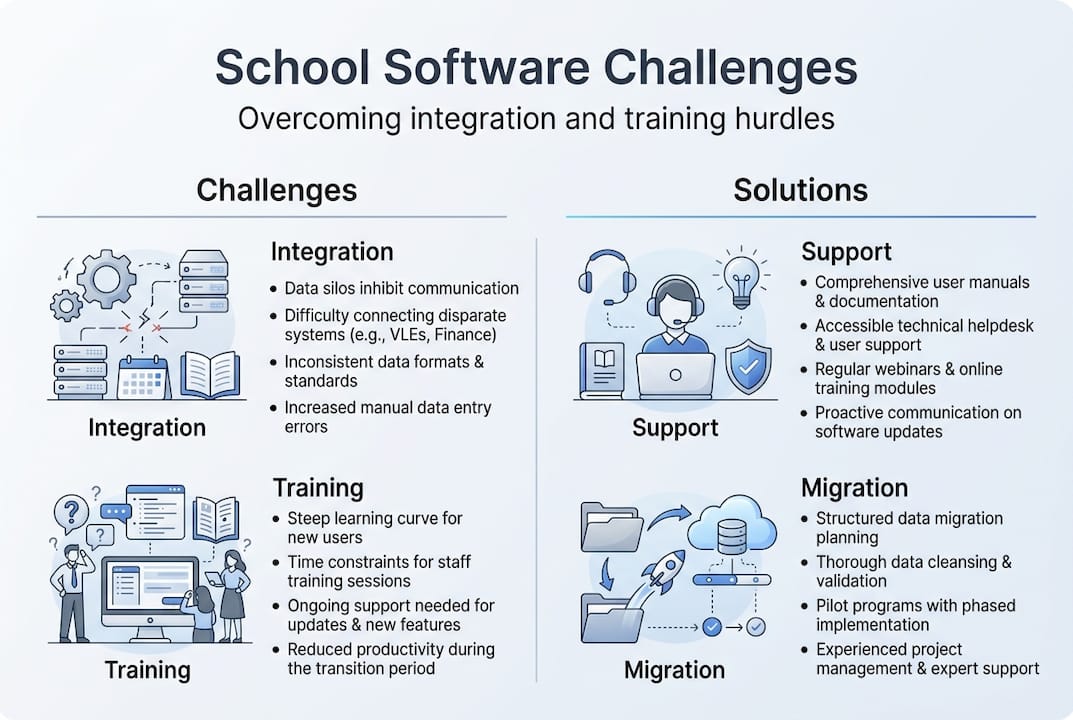
Legacy systems, meaning older MIS databases or bespoke local authority tools, often do not communicate cleanly with modern platforms. Migrating data accurately requires skilled IT support and meticulous planning. Schools without a dedicated IT coordinator face a particular burden here.
Training is equally significant. Even well-designed platforms require structured onboarding, and that takes staff time. The pressure to maintain normal operations during a rollout means training is often compressed or deferred, leading to inconsistent usage across departments.
Reliability is the challenge that carries the highest immediate risk. Bromcom’s 99% uptime still produced major disruptions for schools at the start of term, affecting attendance recording and parent communication when both were critically needed.
“A 99% uptime guarantee still leaves schools exposed to more than three days of potential downtime per year. In a school context, even a few hours at the wrong moment causes real operational harm.”
Here is a breakdown of risk areas and practical mitigations:
| Risk area | Potential impact | Mitigation strategy |
|---|---|---|
| Legacy integration failure | Data loss or duplication | Conduct a full data audit before migration |
| Staff undertrained | Inconsistent system use | Schedule phased training with refreshers |
| Platform outage | Attendance and comms failure | Maintain paper-based backup protocols |
| GDPR non-compliance | Legal and reputational risk | Verify vendor’s data processing agreements |
| Customisation gaps | Unmet SEND or complex needs | Request a trial period with real scenarios |
For schools managing sensitive information about high-needs or SEND pupils, GDPR compliance is non-negotiable. Your data protection guidance obligations extend to every system that processes pupil data, and your vendor must provide a signed Data Processing Agreement before go-live. Understanding the breadth of digital classroom tools also helps leaders anticipate where data flows across systems and where risks may arise.
Pro Tip: Always request a vendor’s historical downtime record, not just their advertised SLA. Ask specifically about incidents that occurred during high-traffic periods such as the first week of term or results days.
Selection and implementation: making the right choice for your school
Selecting the right platform starts with being honest about your school’s actual needs, not aspirational ones. Begin with a requirements checklist divided clearly into must-haves and nice-to-haves.
Essential criteria to define before you evaluate any vendor:
- School phase and size: primary, secondary, special, or MAT
- Existing systems that must integrate or be replaced
- GDPR and statutory compliance requirements
- Staff technical confidence levels
- Budget envelope including implementation, training, and ongoing licensing
Once you have your criteria, use this structured rollout process:
- Shortlist vendors based on UK-school experience, not general edtech reputation
- Request live demonstrations using your real-world scenarios, not polished sales environments
- Speak directly to reference schools of a similar phase and size to your own
- Negotiate a trial period before committing to a full contract
- Appoint an internal implementation lead with protected time for the project
- Phase your rollout by module rather than attempting a full system switch simultaneously
- Schedule review points at four weeks, three months, and one year post-launch
Satisfaction levels are notably higher among primary schools compared to secondary and special settings, largely because the scale and complexity of needs differs so significantly. A platform that works beautifully for a 200-pupil primary may be wholly inadequate for a 1,500-pupil secondary or a multi-academy trust spanning twelve schools.
The importance of edtech support cannot be overstated at this stage. Responsive, UK-based support during your implementation phase is not a luxury. It is a core requirement. Equally, the case for user-friendly edtech becomes most apparent during rollout, when confused or frustrated staff are most likely to revert to old habits.
What most guides miss about school administration software
Most articles about school administration software focus heavily on feature comparisons. We understand the appeal: tables are tidy, and features are measurable. But in our experience, the schools that struggle most with their platforms are rarely suffering from a feature deficit.
What actually determines success is whether senior leadership genuinely champions the system, whether data policies are clear and consistently enforced, and whether the school has a real plan for when things go wrong. An outage response protocol matters more than an impressive SLA document sitting in a filing drawer.
Simpler platforms, supported well, consistently outperform complex ones that are poorly embedded. The schools that get the most from their administration software are those that chose something staff could master quickly, then invested in making it central to daily routines. That cultural shift, not the software itself, is where the real efficiency gain lives.
We explore this further in our thinking on edtech support priorities, and we think it is the most important lens through which any school leader should evaluate their next technology decision.
How eSchools can help UK schools streamline administration
The insights above point to a clear conclusion: the right school administration software must be intuitive, well-supported, and built for the realities of UK schools. That is precisely what eSchools has been delivering for over 14 years.

eSchools provides bespoke school websites, MAT-wide digital solutions, communication platforms, and parent engagement tools, all designed to integrate smoothly and operate reliably. Our UK-based support team is on hand throughout implementation and beyond, so you are never left managing a complex rollout alone. Explore our eSchools case studies to see how schools like yours have streamlined their operations, or visit our school website solutions page to start the conversation with our team.
Frequently asked questions
What is the main function of school administration software?
School administration software centralises student records, attendance, communication, and compliance tasks to improve operational efficiency. It acts as the central hub for data and communication across the whole school.
Can school administration software handle communication with parents?
Yes, most solutions include messaging features or parent portals to support two-way communication and engagement. Parent communication modules are now a defining feature of major school administration platforms.
What integration challenges might UK schools face?
Integration with legacy systems and training requirements are major hurdles, often requiring IT support and staff upskilling. Integration and training are consistently cited as the primary challenges when implementing new school systems.
How do outages affect school operations?
Outages can disrupt attendance recording and parent communication at exactly the moments those functions are most needed. Bromcom’s downtime demonstrated that robust SLAs do not guarantee zero operational disruption.