
TL;DR:
- Integrating school messaging platforms improves family engagement, trust, and reduces administrative workload. Using three or more coordinated channels leads to higher response rates and more effective communication. A unified system simplifies processes and builds consistent, trustworthy relationships with families.
Integrating school messaging is defined as the process of unifying multiple communication channels into a single, cohesive system to improve school-family engagement and reduce administrative burden. The term used across the sector is “unified communications,” and understanding why integrate school messaging matters is the starting point for any school leader serious about family engagement. Schools using three or more coordinated communication channels observe significantly higher response rates than those relying on a single method. That finding alone makes the case for integration. Eschools has spent over 14 years helping UK schools and multi-academy trusts move from fragmented tools to purposeful, connected platforms that serve staff, parents, and pupils alike.
What are the key benefits of integrating school messaging systems?
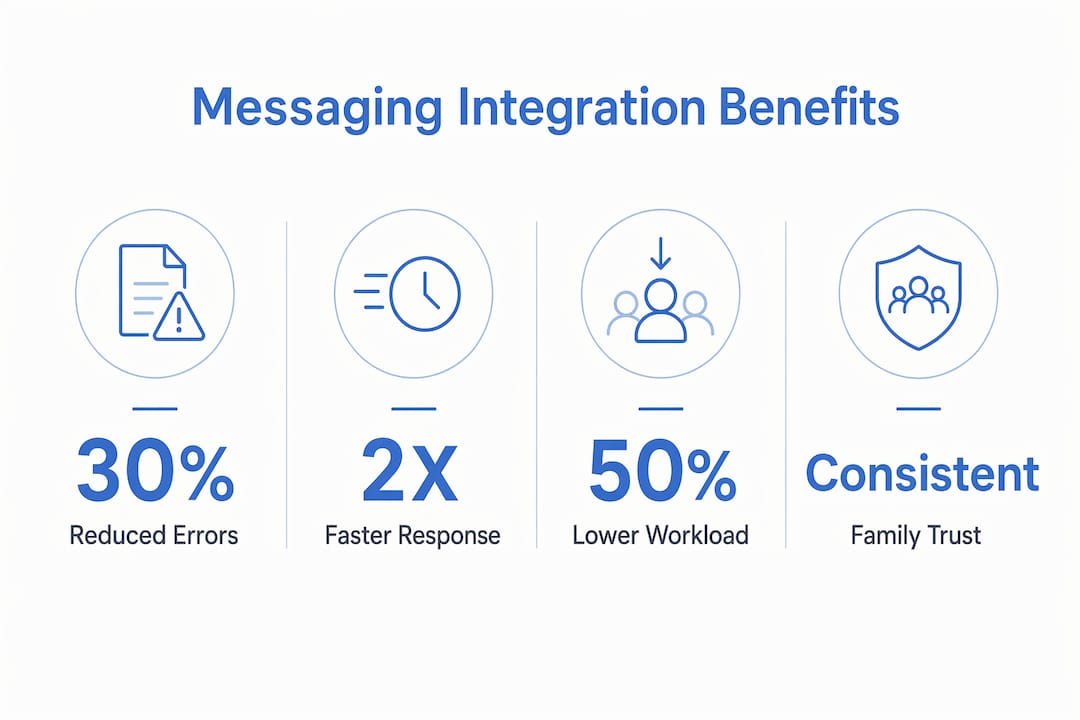
Integrated school messaging systems deliver measurable gains in engagement, trust, and efficiency. The advantages are not theoretical. They show up in daily operations, in parent response rates, and in the confidence families place in your school’s communications.
The core benefits include:
- Higher family engagement. Multi-channel coordination boosts family response rates. When parents receive consistent messages through their preferred channels, they are far more likely to act on them.
- Reduced administrative workload. Unifying platforms removes the need to update contact lists across multiple systems, reconcile attendance records manually, or send the same message through three separate tools.
- Increased trust. Consistent, credible messaging builds confidence. When families receive clear, well-timed communications from a single source, they trust the school more.
- Clearer message hierarchy. Integrated systems allow you to differentiate urgent alerts from routine updates. Maintaining message credibility requires this distinction. If every message feels urgent, families stop engaging with all of them.
- Stronger parent-teacher relationships. A unified platform gives teachers and parents a shared communication space, reducing misunderstandings and improving the quality of dialogue around individual pupils.
Pro Tip: Set up two or three clearly labelled message categories within your platform, such as “Urgent,” “Weekly Update,” and “General Information.” Families quickly learn what each category means, and engagement with genuine alerts rises sharply.
Integration also enables two-way data sharing, allowing parents to provide contextual information to educators. That creates a more complete picture of each pupil and supports more personalised responses from staff.

How does platform integration reduce administrative burden?
The hidden cost of fragmented communication tools is time. Managing 10–15 separate tools undermines communication quality and increases administrative time for educators. That is time taken away from teaching, planning, and supporting pupils.
Platform integration addresses this directly by consolidating the tasks that currently sit across multiple systems:
- Automatic contact updates pulled from your Student Information System (SIS), removing the need for manual data entry
- Attendance and behaviour communications sent from a single environment rather than separate apps
- Grade updates and progress reports delivered through the same channel as general school news
- Archived message histories accessible in one place, reducing time spent searching across inboxes and apps
Teachers prefer platforms integrated with their SIS to avoid manual errors and additional workload. The reason is straightforward: when contact data updates automatically, teachers spend less time correcting mistakes and more time communicating meaningfully.
The unified communication guide for 2026 from Eschools outlines how schools can consolidate tools without disrupting existing workflows. The key is phased adoption, starting with the highest-volume communication tasks and expanding from there.
Pro Tip: Before selecting an integrated platform, map every communication task your staff currently performs across all tools. That audit reveals where time is lost and makes the case for consolidation far more concrete when presenting to governors.
Effective school communication requires embedding outreach as a shared responsibility across all staff, not just one office. Integration makes that shared responsibility practical by giving every member of staff access to the same system and the same data.
Why does consistent messaging build school-family trust?
Trust is the foundation of family engagement, and fragmented communications erode it faster than most school leaders realise. When parents receive conflicting information from a school newsletter, a class teacher’s app, and a separate SMS system, they lose confidence in the school’s ability to communicate reliably. That disengagement is rarely voiced directly. It shows up in lower event attendance, slower response to consent forms, and reduced participation in consultations.
Consolidating communication tools reduces family fatigue and increases trust by creating a clear communication infrastructure. District leaders increasingly treat tool consolidation as a leadership strategy, not just an IT decision. The implication for headteachers and MAT leaders is significant: your communication infrastructure is a direct reflection of your school’s organisational credibility.
Predictable messaging rhythms reinforce that credibility. Families engage more when communication timing is regular and messages are relevant to their child. A weekly digest sent every Friday at 4PM becomes something parents look for. An unexpected message at 11PM on a Tuesday creates anxiety, not engagement.
“District communication is most powerful when it starts in the classroom, reflecting what families already see daily from teachers. Authentic classroom communication builds trust and partnership far more effectively than top-down messaging from a central office.”
That insight reframes how school leaders should think about messaging integration. The goal is not simply to send more messages efficiently. The goal is to build a communication culture where every member of staff contributes to a coherent, trustworthy narrative about the school.
What strategies help schools implement integrated messaging effectively?
Successful implementation of school messaging systems follows a clear sequence. Rushing the process or mandating tools without staff input are the two most common reasons integration fails.
- Audit your current tools. List every platform your school uses for communication, from email and SMS to parent apps and social media. Identify overlaps, gaps, and the tools staff actually use versus those they were told to use.
- Prioritise SIS integration. Any platform you adopt should connect directly to your Student Information System. This removes manual data entry and keeps contact records accurate without additional effort from staff.
- Reduce channel count deliberately. Strategic abandonment of ineffective tools and focusing investment on integrated, purposeful platforms delivers clearer educational value. Fewer channels, used consistently, outperform many channels used inconsistently.
- Differentiate message types. Create a clear taxonomy: emergency alerts, weekly updates, individual pupil communications, and whole-school news. Families learn the system quickly when it is applied consistently.
- Structure communication across levels. District or MAT-level messages, school-level updates, and classroom-level communications each serve a different purpose. Integrated systems allow you to manage all three without duplication.
- Set predictable rhythms. Decide when each message type goes out and stick to it. Consistency builds the habit of engagement in families.
- Build in accessibility. Language barriers and accessibility issues can exclude families from vital school information. Your platform must support multilingual messaging and accessible formats as standard, not as an afterthought.
The table below compares two approaches to school messaging implementation:
| Approach | Characteristics | Outcome |
|---|---|---|
| Fragmented tools | Multiple unconnected apps, inconsistent timing, manual data entry | High admin burden, low family trust, notification fatigue |
| Integrated platform | Single system, SIS-connected, structured message types | Reduced workload, higher engagement, consistent credibility |
Monitoring engagement data is the final step. Open rates, response times, and opt-out rates tell you whether your communication strategy is working. Adjust message timing, format, or frequency based on what the data shows, not on assumption.
Key takeaways
Integrating school messaging into a unified, SIS-connected platform is the single most effective way to improve family engagement, reduce administrative workload, and build lasting trust between schools and the families they serve.
| Point | Details |
|---|---|
| Multi-channel coordination works | Schools using three or more coordinated channels achieve significantly higher family response rates. |
| Integration cuts hidden admin time | Consolidating tools removes manual data entry, contact reconciliation, and duplicate messaging tasks. |
| Trust depends on consistency | Predictable, well-structured messaging builds family confidence and reduces disengagement over time. |
| Message hierarchy prevents fatigue | Differentiating urgent from routine communications keeps families engaged with alerts that matter. |
| Accessibility is non-negotiable | Multilingual and accessible messaging formats ensure no family is excluded from vital school information. |
What I’ve learned about school messaging that most guides miss
School leaders often approach messaging integration as a technology project. It is not. It is a culture project that happens to involve technology. The tools matter far less than the habits, expectations, and shared ownership that sit around them.
The most common pitfall I see is the top-down mandate. A senior leader selects a platform, IT configures it, and teachers are told to use it from Monday. Adoption is poor, workarounds multiply, and within a term the school is back to managing multiple tools. Involving classroom teachers early in platform selection is not a courtesy. It is the difference between a system that gets used and one that gathers digital dust.
The second thing most guides miss is the relationship between message volume and trust. Schools that communicate more frequently do not automatically build stronger relationships with families. Schools that communicate predictably and relevantly do. Cutting three redundant channels and replacing them with one well-managed platform is a braver and more effective decision than adding another app to the mix.
Communication is not a task you complete. It is an ongoing relationship you maintain. The schools that understand this treat their messaging infrastructure with the same seriousness they give to curriculum planning or safeguarding. That shift in mindset is where real improvement begins.
— Ed
How Eschools supports school communication integration
Eschools has worked with UK schools and multi-academy trusts for over 14 years, building digital tools that make communication simpler and more effective for everyone involved.

The Eschools platform brings together school websites, communication tools, and parent engagement features into a connected environment designed for school leaders and administrators. Whether you are managing communication across a single school or coordinating messaging at MAT level, Eschools provides the infrastructure to do it consistently and efficiently. You can see how schools are already benefiting by visiting the Eschools case studies page, or explore the parent communication app to understand how integrated messaging works in practice. If you are ready to move from fragmented tools to a purposeful platform, Eschools is built to support that transition from day one.
FAQ
Why integrate school messaging rather than use separate tools?
Separate tools create inconsistent messaging, manual data errors, and notification fatigue for families. A unified system reduces administrative burden and significantly improves family engagement rates.
What is the biggest risk of fragmented school communication?
Fragmented communication erodes family trust over time. When parents receive conflicting or inconsistent messages from multiple sources, they disengage from school communications altogether.
How does SIS integration improve school messaging?
Connecting your messaging platform to your Student Information System keeps contact records accurate automatically. Teachers avoid manual updates and the errors that come with them.
How many communication channels should a school use?
Schools using three or more coordinated channels achieve higher response rates than those using a single method. The key word is coordinated. Unconnected channels create confusion rather than reach.
How can schools avoid notification fatigue among parents?
Differentiate message types clearly, using distinct categories for urgent alerts, weekly updates, and general information. When families understand the system, they engage with the messages that matter most.