
TL;DR:
- A school website is crucial for communication with students, parents, and staff, and must be well-planned, accessible, and mobile-friendly. Choosing the right platform and maintaining accurate, regularly updated content ensures the site effectively supports admissions and community engagement. Ongoing testing and compliance with legal standards prevent the site from becoming outdated or non-compliant after launch.
A school website is the primary public-facing communication channel for students, parents, and staff. Knowing how to build a school website that serves all three audiences, meets UK GDPR requirements, and drives admissions enquiries is a practical skill every school administrator needs. This guide covers planning, platform selection, design, content strategy, and launch, giving you a clear path from blank page to published site that works for your whole school community.
What essential planning steps are needed before building a school website?
Good planning separates a website that works from one that creates more problems than it solves. Before you write a single line of content or choose a platform, define what your site must achieve.
Start with three core goals: supporting admissions, improving communication with parents, and representing your school’s brand accurately. Each goal shapes the pages you need, the tone you use, and the features you prioritise. A school focused on growing its intake needs a compelling admissions section with clear next steps. A school with a large existing parent community needs reliable news, calendar, and notification tools.
- Define your goals. Write down the three to five outcomes your website must deliver. Tie each one to a measurable result, such as reducing phone enquiries about term dates or increasing open-day registrations.
- Map your audiences. Parents, prospective families, current pupils, staff, and governors all use your site differently. List what each group needs to find quickly.
- Build a sitemap. A clear sitemap increases user satisfaction and reduces enquiries caused by hard-to-find information. Sketch out your main navigation pages and the sub-pages beneath each one before you touch any platform.
- Register a professional domain. A domain like yourschool.sch.uk signals credibility to prospective families and search engines alike. Secure it before you begin building.
- Assign content owners. Decide who updates each section. A site with no named owner goes stale within weeks of launch.
Pro Tip: Map your content before choosing a platform. Knowing how many pages you need and how complex your navigation is will tell you whether a simple website builder or a full content management system is the right fit.
Which platforms and tools are suitable for building a school website?
The platform you choose determines how much control you have, how much you spend, and how easily your staff can manage content day to day. Three broad categories cover most school needs.
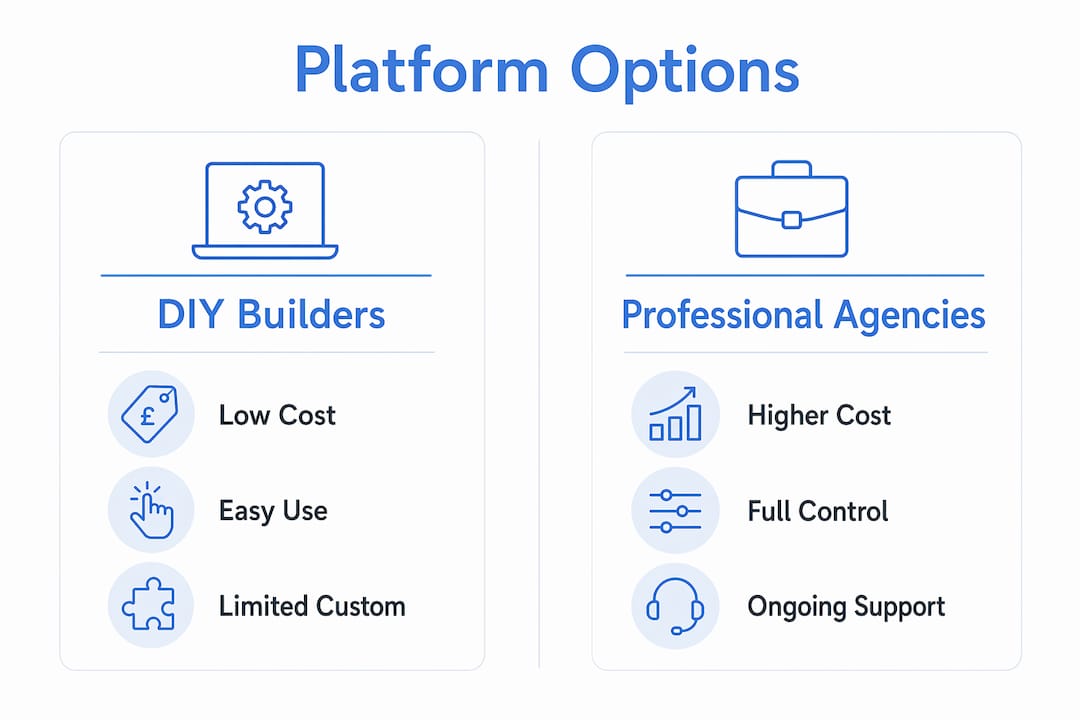
| Option | Typical cost | Customisability | Maintenance demand |
|---|---|---|---|
| DIY website builder | From £5/month | Low to medium | Low |
| CMS platform (e.g. WordPress) | Hosting from £10/month + developer fees | High | Medium to high |
| Professional agency build | From £2,000 upfront | Very high | Low (agency managed) |
DIY builders suit schools with limited budgets and small sites. They require no technical knowledge, but they often lack the specific features schools need, such as document repositories, parent consent forms, or DfE-compliant statutory pages. CMS platforms like WordPress offer far greater flexibility but require someone with technical confidence to manage plugins, security updates, and backups. A professional agency build, such as those offered by Eschools, delivers a bespoke site built to your specification, with ongoing support included. The upfront cost is higher, but the total cost of staff time saved on maintenance often justifies it.
Pro Tip: Ask any platform or agency whether their solution includes built-in DfE compliance checking. Retrofitting statutory pages after launch is time-consuming and carries reputational risk if Ofsted flags gaps during an inspection.
The right choice depends on your school’s technical capacity and long-term ambitions. A single-form-entry primary school and a multi-academy trust have very different needs. Eschools specialises in bespoke school websites built specifically for UK educational settings, with compliance and usability built in from the start.
How to design a mobile-friendly, accessible, and user-focused school website?
Design is not decoration. Every layout decision affects whether a parent finds the information they need in under thirty seconds or gives up and phones the office instead.

Mobile usage accounts for over 50% of school website visits. That figure means a site that looks good on a desktop but breaks on a phone is failing the majority of your visitors before they read a single word. Mobile-first design means building for the smallest screen first and scaling up, not the other way around.
Accessibility is a legal and ethical requirement, not an optional extra. The Web Content Accessibility Guidelines (WCAG) and Section 508 standards require that text resizes to 200% without loss of content or functionality, that colour contrast meets minimum ratios, and that all images carry descriptive alt text. A school website that fails these standards excludes disabled users and risks non-compliance. The connection between web accessibility and SEO is also well established. Accessible sites rank better in search results because they are structurally cleaner and easier for search engines to read.
Key design principles to apply from day one:
- Use a single, consistent navigation bar with no more than seven top-level items.
- Choose a font size of at least 16px for body text and maintain strong contrast between text and background.
- Place the most frequently sought information, term dates, contact details, and the admissions page, within one click of the homepage.
- Test every page on a mobile device before publishing.
- Include engaging images and video that reflect your school community. Visual content increases visitor retention and shapes the first impression prospective families form of your school.
A well-designed school website also reflects your brand consistently. Use your school colours, logo, and tone of voice across every page. Inconsistency signals a lack of attention to detail, which is not the message any school wants to send.
What content and features should a school website include?
Content is what makes a school website genuinely useful. A beautiful site with thin or outdated content fails its audience within days of launch.
Every school website needs a core set of sections: admissions information, academic programmes, a school calendar, news and announcements, a staff directory, and a contact page. Beyond these basics, the features you add should reflect your audience’s actual needs.
| Feature | Primary audience | Impact |
|---|---|---|
| Admissions page with enquiry form | Prospective families | Increases applications and reduces phone enquiries |
| Events calendar | Current parents and pupils | Reduces missed events and administrative queries |
| Document repository | Parents and governors | Provides 24/7 access to policies and letters |
| News section | All audiences | Builds community and demonstrates school activity |
| Staff directory | Parents and prospective staff | Builds trust and reduces misdirected contact |
Regular updates to events, news, and calendars keep current families informed and reduce the volume of administrative queries your office receives. A site that shows a news article from eighteen months ago tells parents the school is not paying attention.
SEO optimisation matters more than most school leaders realise. Unique title tags and meta descriptions on every page improve your search rankings and make your admissions page more visible to families searching for schools in your area. This is not a technical luxury. It is a practical admissions tool. A well-designed website also has a direct impact on SEO performance, so design and content strategy should be planned together from the outset.
Pro Tip: Create a content calendar that assigns update responsibilities by month. Term dates, governor meeting minutes, and statutory policies all have predictable update cycles. Scheduling them in advance prevents the site from going stale.
UK GDPR and the Data Protection Act 2018 require clear privacy notices and parental consent before publishing children’s photographs on your website. Build your consent process before you publish any images. Retrofitting compliance after launch is far harder than getting it right from the start.
How to test, launch, and maintain a school website effectively?
Testing before launch prevents the kind of embarrassing errors that undermine confidence in your school’s digital presence. A broken contact form or a missing safeguarding policy on launch day creates more work than a delayed launch would have.
Follow these steps before you go live:
- Cross-device testing. Open every page on a desktop, tablet, and mobile phone. Check that images load, text is readable, and navigation works on all three.
- Browser testing. Test on Chrome, Firefox, Safari, and Edge. A page that breaks in one browser will affect a significant portion of your visitors.
- Link and form checking. Click every internal link and submit every form. Confirm that form submissions reach the correct email address.
- Accessibility audit. Run your site through a free tool such as the WAVE Web Accessibility Evaluation Tool. Fix any critical errors before launch.
- Legal compliance review. Confirm that your privacy notice, cookie banner, and DfE statutory requirements are all present and accurate.
- SSL certificate. Confirm your site loads over HTTPS. An unsecured site triggers browser warnings that deter visitors and damage trust.
After launch, maintenance is not optional. Role-based permissions prevent unauthorised changes and reduce security risks by ensuring only named staff can edit specific sections. Assign a named website lead who reviews content monthly, checks for broken links quarterly, and coordinates the annual statutory compliance review. A school website is a live document, not a one-off project.
Key takeaways
Building an effective school website requires structured planning, the right platform, accessible design, and a clear content strategy maintained consistently after launch.
| Point | Details |
|---|---|
| Plan before you build | Define goals, map audiences, and create a sitemap before choosing any platform. |
| Match the platform to your capacity | DIY builders suit small budgets; agency builds suit schools needing compliance and support. |
| Design for mobile first | Over 50% of school website visits come from mobile devices, so responsive design is non-negotiable. |
| Meet legal requirements from day one | UK GDPR, WCAG, and DfE statutory requirements must be built in, not added later. |
| Maintain content consistently | Assign named content owners and a monthly review cycle to keep the site accurate and useful. |
Why most school websites fail within a year of launch
The most common mistake I see is treating a school website as a project with a finish line. Schools invest time and budget in the build, celebrate the launch, and then quietly let the site drift. Within twelve months, the news section shows articles from the previous academic year, the calendar is empty, and the admissions page still references an open day that happened eight months ago.
The second mistake is building for the headteacher’s preferences rather than the parent’s needs. I have reviewed school sites where the homepage leads with a lengthy welcome message from the head, while the term dates, the single piece of information every parent visits the site to find, are buried three clicks deep. That is a design decision made for the wrong audience.
Accessibility is the area where I see the most avoidable risk. Schools that skip WCAG compliance checks are not just failing disabled users. They are creating legal exposure and, in many cases, actively harming their search visibility. The fix is rarely expensive. It is almost always a matter of attention.
My honest advice is to treat your website as a living communication tool, not a digital brochure. Involve parents, staff, and governors in the planning stage. Ask them what they actually search for. Run a short survey. The answers will surprise you and will almost certainly change your navigation structure. Build in a review cycle from day one, assign real ownership, and resist the temptation to add features you cannot maintain. A simple, accurate, accessible site outperforms a complex, neglected one every time.
— Ed
Professional school websites built for UK schools
Eschools has over 14 years of experience building websites specifically for UK schools and multi-academy trusts. Every site is designed to meet DfE statutory requirements, WCAG accessibility standards, and UK GDPR obligations from the outset, so your team is not left managing compliance alone.
Eschools’ school website solutions include bespoke design, ongoing support, and tools that reduce administrative workload for your staff. From parent communication features to document repositories and event management, the platform is built around the real operational needs of school communities. You can see examples of their work across a range of schools and trusts in the Eschools portfolio. If your current site is not serving your community as well as it should, Eschools is a practical next step.
FAQ
What does a school website need to include?
Every school website must include admissions information, a school calendar, a staff directory, a contact page, and DfE statutory policies. UK GDPR also requires a clear privacy notice and a cookie consent mechanism.
How much does it cost to build a school website?
DIY website builders start from around £5 per month, while professional agency builds typically start from £2,000 upfront. Ongoing costs vary depending on hosting, support, and content management arrangements.
How do I make a school website mobile-friendly?
Use a responsive design framework that adapts your layout to the screen size automatically. Test every page on a mobile device before publishing, and prioritise fast load times by compressing images.
What is WCAG and does my school website need to comply?
WCAG stands for Web Content Accessibility Guidelines. UK public sector bodies, including schools, are required to meet WCAG 2.1 AA standards, which cover text resizing, colour contrast, and screen-reader compatibility.
How often should a school website be updated?
News, events, and calendar pages need updating at least fortnightly during term time. Statutory policies and governor information require an annual review, and admissions content must be accurate ahead of each application cycle.