
TL;DR:
- Efficient school operations involve automating routine tasks, auditing processes, and improving communication protocols. Implementing integrated management platforms and phased digital adoption significantly reduces staff workload and administrative time. Prioritizing clear policies, ownership, and staff wellbeing yields the greatest operational improvements.
Efficient school operations management is defined as the systematic process of reducing administrative waste, unifying digital workflows, and aligning staff communication so that more time reaches teaching and learning. For school leaders seeking to know how to streamline school operations, the core answer is this: automate routine tasks, audit your processes before digitising them, and build communication protocols that reduce noise rather than add to it. Schools that implement these three principles consistently report measurable gains in staff time, wellbeing, and institutional cohesion. The Department for Education and edtech bodies increasingly treat operational efficiency as a governance priority, not an optional upgrade.
What tools and technologies are essential for streamlining school operations?
The foundation of any efficient school is an integrated management platform that connects attendance, finance, communication, and reporting in one place. Schools implementing comprehensive management software report a 30–50% reduction in administrative overhead by automating routine tasks like attendance and report card generation. That figure represents hours returned to staff every week, not just a marginal efficiency gain.

Cloud-based ERP systems go further. They can cut processing time by over 50% by replacing disconnected spreadsheets and manual data entry across finance, payroll, and student records. The practical implication is that a bursar no longer reconciles three separate systems at month end. Everything feeds into one source of truth.
Digitising paper-based workflows produces equally striking results. Workflow digitisation reduces application completion time from 2 hours to 20 minutes and saves over 1,000 employee hours annually. For a school of 600 pupils, that is the equivalent of reclaiming weeks of administrative capacity each year.
New AI-powered automation tools now allow school business managers to build customised automated workflows without any programming expertise. This removes the traditional barrier of needing an IT specialist to configure every new process.
| Feature category | Manual approach | Digital platform approach |
|---|---|---|
| Attendance tracking | Paper registers, manual entry | Automated real-time recording |
| Finance management | Separate spreadsheets per budget | Unified dashboard with audit trail |
| Parent communication | Individual emails and letters | Broadcast messaging with read receipts |
| Report generation | Staff compile data manually | Automated reports from live data |
| Scheduling | Printed timetables, manual updates | Centralised digital calendar |
Pro Tip: Before selecting any platform, map your existing workflows for one week. Note which tasks consume the most staff time. Choose software that addresses your top three time drains first, not the platform with the longest feature list.
How can schools improve internal communication to reduce workload?
Poor internal communication is one of the most underestimated drains on school efficiency. Email overload, inconsistent messaging channels, and unclear response expectations create friction that compounds daily. A DfE intervention focused on internal school communication produced an 18% reduction in weekly communication time among staff. That result came from policy changes, not new software.
Clear email protocols and short daily briefings reduce communication overload significantly without requiring complex technology. The discipline of defining when staff should use email versus a shared noticeboard versus a direct message removes the ambiguity that generates unnecessary back-and-forth.
Modern communication frameworks prioritise moving from correction to cohesion by improving visibility and engagement across the whole school community. This means designing communication systems that keep staff informed proactively, rather than reactively firefighting misunderstandings.
Practical steps school leaders can implement immediately include:
- Set a school-wide email response window, for example 24 hours on weekdays, and communicate it to all staff.
- Replace whole-staff email threads with a shared digital noticeboard for non-urgent updates.
- Introduce a brief daily briefing of no more than five minutes, either in person or via a recorded message.
- Restrict “reply all” use to genuinely whole-staff matters through a written policy.
- Use a dedicated parent communication app to separate parent-facing messages from internal staff channels.
- Review meeting frequency and replace standing meetings with asynchronous updates where possible.
Pro Tip: Audit your staff inbox for one week and categorise every email by type. You will almost certainly find that 30–40% of messages could be replaced by a shared document or noticeboard post. Use that data to build your communication policy.
What steps should leaders take before automating school processes?
Automating a broken process does not fix it. It accelerates the problem. Mapping existing workflows prevents this mistake by revealing inefficiencies and redundancies that technology alone cannot resolve. This is the most important principle in operational improvement, and it is the one most frequently skipped.
An operational audit gives you a clear picture of how time and resources are actually spent, as opposed to how you assume they are spent. The gap between those two pictures is almost always larger than expected. High-impact areas to audit first include pupil enrolment, timetabling, absence reporting, and finance approvals.
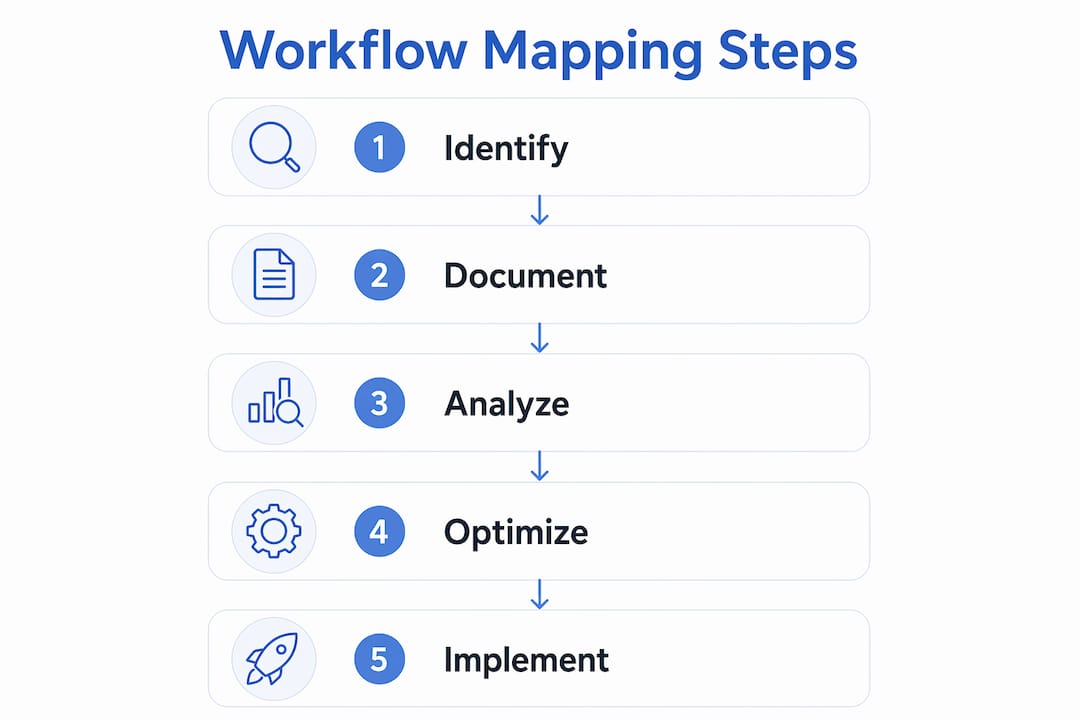
The recommended approach to workflow mapping follows five steps:
- Select a process to audit. Start with the workflow that generates the most staff complaints or the most visible delays, such as the enrolment process or weekly absence reporting.
- Document every step as it currently happens. Interview the staff who do the work, not just those who manage it. Record each action, decision point, and handover.
- Identify tasks that require no human judgement. Data entry, form routing, and standard notifications are prime candidates for automation. Automating judgement-free tasks first frees staff for work that genuinely requires their expertise.
- Remove redundant steps before digitising. If a step exists only because of a legacy paper process, eliminate it. Digitising a redundant step embeds it permanently.
- Pilot the revised process with one team. Run the improved workflow for four weeks, gather feedback, and refine before rolling out school-wide.
This sequence protects you from the common error of purchasing software and then trying to fit your school’s processes around it. The process audit defines your requirements. The software serves those requirements.
What is the recommended approach for phased digital adoption?
Phased digital adoption is the practice of introducing technology in deliberate stages rather than deploying all tools simultaneously. A phased approach starting with attendance and parent communication reduces staff overwhelm and produces smoother transitions. The logic is straightforward: early wins build confidence, and confidence drives adoption.
The recommended sequence for most UK schools runs over 6–12 months. Begin with attendance and parent communication, then move to fee collection and finance, then grading and reporting, and finally advanced analytics and cross-departmental integration. Each stage embeds before the next begins.
| Deployment approach | Benefits | Risks |
|---|---|---|
| Phased rollout over 6–12 months | Staff confidence builds gradually; issues are contained; training is manageable | Slower to realise full benefits |
| Rapid full deployment | Faster theoretical benefit realisation | High resistance risk; errors affect all systems simultaneously |
Training and internal communication are not optional extras in a phased rollout. They are the mechanism by which adoption actually happens. Designate a digital champion in each department, someone who receives early training and supports colleagues during the transition. This peer-to-peer model reduces the burden on senior leaders and creates local accountability.
Resistance is normal and predictable. Staff who have used the same process for years will question whether change is necessary. The most effective response is not to mandate adoption but to demonstrate time saved. Show a sceptical colleague that the new attendance system takes 90 seconds instead of 10 minutes. Concrete evidence outperforms any argument. For a broader view of how technology integration supports smarter school operations, the principles of phased adoption apply equally to communication, learning platforms, and governance tools.
Key takeaways
Improving school operational efficiency requires auditing processes before automating them, adopting technology in phases, and enforcing communication protocols that reduce workload rather than add to it.
| Point | Details |
|---|---|
| Audit before you automate | Map current workflows to remove redundant steps before selecting any software. |
| Start with high-impact areas | Attendance and parent communication deliver the fastest, most visible efficiency gains. |
| Communication policy matters | DfE evidence shows an 18% reduction in staff communication time from protocol changes alone. |
| Phase your technology adoption | A 6–12 month phased rollout builds staff confidence and reduces the risk of system-wide errors. |
| Automate judgement-free tasks first | Freeing staff from data entry and form routing returns time for teaching and strategic work. |
The operational bottleneck nobody talks about
School leaders spend considerable energy evaluating software. They spend far less time evaluating the policies and habits that sit beneath the software. In my experience, the schools that achieve the greatest operational gains are not the ones with the most sophisticated platforms. They are the ones that have done the unglamorous work of agreeing on how they communicate, who owns which process, and what “done” looks like for a given task.
Technology amplifies whatever is already there. A school with clear ownership and sensible protocols will get enormous value from a well-chosen platform. A school with ambiguous responsibilities and no communication norms will find that new software creates new arguments about who should have received which notification.
The DfE workload reduction toolkit is one of the most underused resources available to UK school leaders. It contains practical, evidence-based guidance on communication, marking, and planning that costs nothing to implement. Pairing that guidance with the right digital tools is where the real gains appear.
My strongest advice is this: prioritise staff wellbeing as an operational metric, not a pastoral one. When administrative tasks are genuinely reduced, staff retention improves, sickness absence falls, and the school functions better in every dimension. That is not a soft outcome. It is a measurable return on the investment you make in getting your operations right.
— Ed
How Eschools supports efficient school operations
Eschools has spent over 14 years helping UK schools and multi-academy trusts build the digital foundations that make operational efficiency achievable. From bespoke school websites to parent communication tools and online learning platforms, every Eschools product is designed to reduce administrative complexity rather than add to it.

The Eschools platform gives staff role-based access to the tools they need, without the clutter of features they do not. Integration across communication, engagement, and administration means your team works from one consistent system. If you want to see how schools like yours have put these principles into practice, the Eschools Our Work page sets out real examples of digital transformation done well. For schools focused on parent engagement specifically, the Eschools parents evening booking system removes one of the most time-consuming administrative tasks from the school calendar entirely.
FAQ
What does streamlining school operations mean?
Streamlining school operations means reducing administrative waste by unifying digital workflows, automating routine tasks, and establishing clear communication protocols. The goal is to return time to teaching and strategic leadership.
How much time can schools save by digitising administration?
Digitising workflows can reduce application completion time from 2 hours to 20 minutes and save over 1,000 employee hours annually. Cloud-based ERP systems can cut administrative processing time by over 50%.
Should schools automate all processes at once?
Schools should not automate all processes simultaneously. A phased approach starting with attendance and parent communication reduces staff resistance and produces more sustainable results over 6–12 months.
How can school leaders reduce email overload among staff?
Setting clear email response windows, restricting “reply all” use, and replacing non-urgent emails with a shared digital noticeboard are the most effective measures. DfE evidence shows these protocol changes alone can reduce weekly communication time by 18%.
What should schools do before buying new management software?
Schools should conduct an operational audit to map current workflows, identify redundant steps, and define their top administrative time drains. Selecting software before completing this audit risks purchasing a platform that does not address the real bottlenecks.