
TL;DR:
- Inclusive school websites ensure equal access to information and resources for all community members, regardless of ability or device. They are essential for legal compliance, support diverse users through universal design, and improve operational efficiency by reducing parent inquiries and misinformation. Ongoing staff training and regular accessibility reviews are crucial to maintaining an inclusive digital environment that reflects the school’s commitment to equity.
An inclusive school website is defined as a digital platform that provides equal access to information, resources, and services for every member of the school community, regardless of ability, device, or technical skill. Understanding why inclusive school websites matter is no longer optional for school leaders. The UK’s Public Sector Bodies Accessibility Regulations and updated international guidance under the Americans with Disabilities Act Title II both confirm that inaccessible web content is a form of exclusion, as serious as a building without a wheelchair ramp. For headteachers, governors, and IT coordinators, the case for accessible design is simultaneously legal, moral, and operational.
Why inclusive school websites matter: the core argument
Inclusive school websites remove barriers that prevent students, parents, and staff from accessing the information they need independently. The Web Content Accessibility Guidelines (WCAG), published by the World Wide Web Consortium (W3C), provide the technical standard that underpins most accessibility regulations in the UK and internationally. Meeting these standards is not a technical nicety. It is the difference between a school community that functions well digitally and one that routinely excludes its most vulnerable members.

Inaccessible digital content excludes students with disabilities from course materials and student portals, directly affecting their participation and outcomes. Blind students, in particular, face delays and barriers when public entities rely on inaccessible websites for learning materials. That is not a theoretical risk. It is a documented pattern that Ofsted and the Department for Education (DfE) increasingly expect schools to address as part of their broader inclusion strategy.
The importance of inclusive school websites extends beyond students. Parents with visual impairments, dyslexia, or limited English proficiency rely on accessible design to stay informed about their child’s education. Staff with disabilities need accessible internal pages to do their jobs effectively. When a school website works for everyone, it signals that inclusion is not a classroom policy alone. It is a whole-school commitment.
How does inclusive design support diverse users?
Universal design is the principle that environments built to support the most vulnerable users work better for everyone. Applied to school websites, this means that features created for users with disabilities simultaneously improve the experience for the wider school community.
The core accessibility features every school website needs include:
- Alt text on images: Screen readers used by blind or visually impaired users read alt text aloud. Without it, images are invisible to those users.
- Logical heading structure: Proper use of H1, H2, and H3 tags allows screen readers and keyboard-only users to navigate pages efficiently.
- Keyboard navigation: Every page function must be operable without a mouse, supporting users with motor impairments.
- Sufficient colour contrast: Text must meet minimum contrast ratios so users with low vision or colour blindness can read content clearly.
- Descriptive link text: Links labelled “click here” are meaningless to screen reader users. Links labelled “download the term dates PDF” are not.
- Captions on video content: Deaf and hard-of-hearing users, as well as users in noisy environments, depend on accurate captions.
Universal design benefits all users by creating environments that function effectively for people with and without disabilities. A parent checking the school newsletter on a slow mobile connection benefits from the same clean, well-structured layout that helps a screen reader user navigate the page. The two goals are not in tension. They reinforce each other.
Pro Tip: Run your school website through the WebAIM Wave tool or the Axe browser extension for a free, instant snapshot of your most critical accessibility gaps before commissioning a full audit.
Staff training is a non-negotiable part of inclusive website design. Technical coding standards are necessary but not sufficient. Even a well-coded website becomes inaccessible if staff upload PDFs without tags, post images without alt text, or write link text that lacks context. Training your content editors is as important as choosing the right platform.
What operational benefits do accessible school sites deliver?
The benefits of accessible school sites extend well beyond compliance. Schools with accessible websites report a measurable reduction in parent phone calls and email enquiries. Clear navigation and accessible content reduce parental stress and improve family involvement by making key information easy to find without staff assistance.
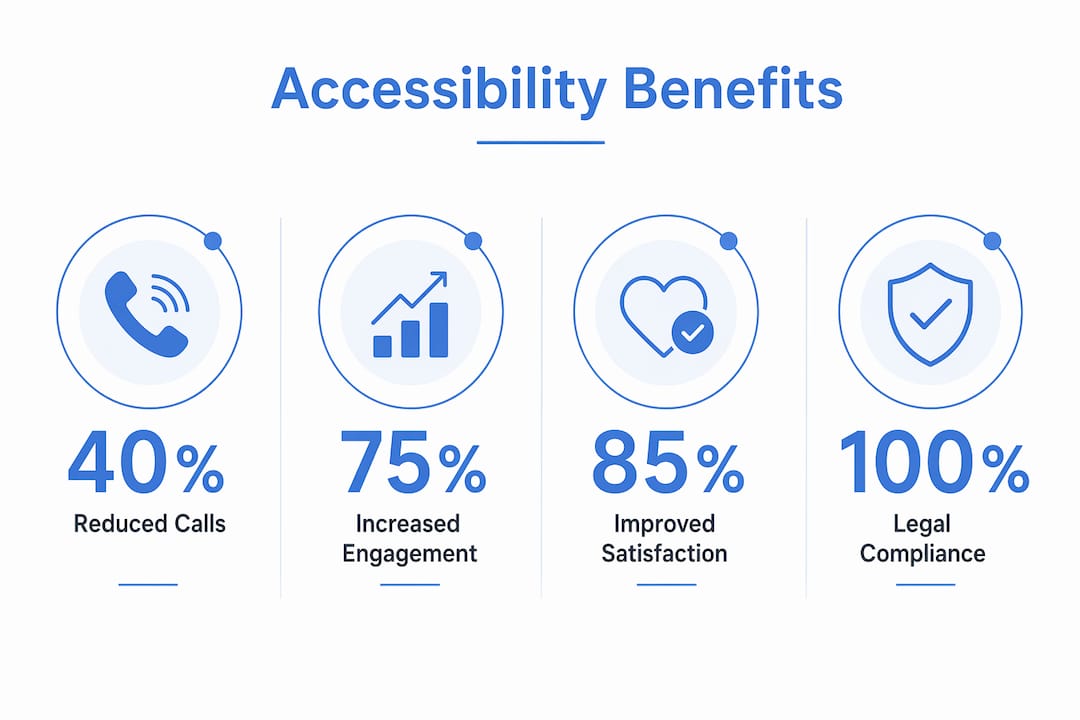
Think about the volume of calls a school office receives each term asking about closure dates, transport arrangements, or how to book a parents’ evening. When that information is clearly structured, mobile-friendly, and accessible to all users, many of those calls simply do not happen. That frees your office staff to focus on work that genuinely requires human interaction.
Schools with accessible websites report reduced calls and emails, freeing staff to focus more on educational support. This is the operational case for inclusive website design, and it is one that resonates directly with school business managers and headteachers managing stretched administrative teams.
Pro Tip: Audit your most-visited pages first. Your homepage, term dates page, and admissions information typically account for the majority of parent traffic. Making those three pages fully accessible delivers the greatest operational return for the least effort.
A well-structured school digital presence also reduces the risk of misinformation spreading through informal channels. When parents can find accurate, up-to-date information independently, they are less likely to rely on playground rumour or social media speculation. That has a direct impact on school reputation and community trust.
Do inclusive websites reflect a school’s commitment to equity?
Digital inclusion is a direct extension of the inclusive education values that schools already hold. A school that champions belonging and equity in its classrooms but maintains an inaccessible website sends a contradictory message to its community.
Accessible websites support students’ dignity and confidence by enabling self-service rather than requiring special accommodations. A student using a screen reader who can independently check their timetable, access homework resources, and read school news is experiencing the same autonomy as any other student. That independence matters. It reinforces the message that the school sees them as a full participant in school life, not a special case requiring workarounds.
“Digital inclusion mirrors classroom inclusion as a moral imperative. It fosters student dignity by enabling independent access rather than requiring special accommodation.” — Inclusive Web
Community trust is built through consistency. When your website reflects the same values as your school development plan and your SEND policy, governors and Ofsted inspectors see a school that lives its stated commitments. Conversely, a school that promotes inclusion in its prospectus but cannot be navigated by a parent using a screen reader faces a credibility gap that is difficult to explain away.
The impact of an inclusive school digital presence extends to student wellbeing. When young people with disabilities see their school investing in tools that work for them, it communicates respect. That is not a soft benefit. Research on belonging and academic engagement consistently links perceived respect to improved outcomes.
What practical steps make a school website truly inclusive?
Moving from intention to practice requires a structured approach. The following steps give school leaders a clear path to improving accessibility without needing specialist technical knowledge.
- Commission an accessibility audit. Start with an automated tool such as WebAIM Wave or Google Lighthouse to identify obvious issues. Then go further. Automated checkers detect only 30–50% of accessibility barriers. Real-user testing with assistive technologies, including screen readers such as JAWS or NVDA, is the only way to find the barriers that automated tools miss.
- Train all content editors. Every member of staff who uploads content to your website needs basic accessibility training. This covers writing descriptive alt text, using heading styles correctly, and avoiding inaccessible file formats where possible.
- Review your platform’s built-in accessibility support. Some website platforms provide stronger accessibility foundations than others. Check whether your current platform meets WCAG 2.1 AA as a baseline.
- Publish an accessibility statement. The UK’s Public Sector Bodies Accessibility Regulations require schools to publish an accessibility statement on their website. This must describe known issues and provide a contact route for users who encounter barriers.
- Schedule regular reviews. Accessibility is not a one-time fix. Every time you add new content, a new page, or a new feature, accessibility must be checked. Build a review cycle into your annual website management plan.
The table below summarises the two most common approaches schools take when addressing accessibility:
| Approach | What It Covers | Limitations |
|---|---|---|
| Automated audit only | Detects coding errors, missing alt text, contrast failures | Misses 50–70% of real-user barriers |
| Automated audit plus real-user testing | Covers coding issues and lived experience of assistive technology users | Requires more time and coordination |
The second approach is the best practice standard. It is also the one that will satisfy a formal complaint or an Ofsted enquiry about your inclusion provision.
Key takeaways
Inclusive school websites are the operational and moral foundation of a school’s digital presence, and every school leader should treat accessibility as a statutory responsibility, not an optional upgrade.
| Point | Details |
|---|---|
| Legal compliance is non-negotiable | UK regulations require schools to meet WCAG 2.1 AA and publish an accessibility statement. |
| Universal design helps everyone | Accessibility features built for disabled users improve usability for the entire school community. |
| Operational efficiency improves | Accessible, clearly structured websites reduce parent enquiries and free up administrative staff time. |
| Staff training is as important as technology | Well-coded platforms fail if content editors do not apply accessible formatting and alt text. |
| Real-user testing is the gold standard | Automated tools detect only 30–50% of barriers; testing with screen reader users is required for full compliance. |
The uncomfortable truth about school website accessibility
I have worked with schools across the UK for a number of years, and the pattern I see most often is this: school leaders genuinely care about inclusion, but they assume their website is accessible because it looks clean and modern. Visual design and accessibility are not the same thing. A beautifully designed website can be completely invisible to a screen reader user if the underlying structure is wrong.
The other misconception I encounter regularly is that accessibility is a one-time project. Schools invest in an audit, fix the issues flagged, and consider the matter closed. Six months later, a new member of staff has uploaded thirty untagged PDFs and the homepage has a video with no captions. Accessibility requires ongoing governance, not a single sprint.
What I find genuinely encouraging is that schools which embed accessibility into their content management processes, rather than treating it as a separate compliance task, see the widest benefits. Their websites become genuinely useful tools for the whole community. Parent engagement improves. Administrative pressure drops. And the school’s reputation for inclusion becomes something it can demonstrate, not just claim.
The investment required is not enormous. The right platform, basic staff training, and a quarterly review cycle are sufficient for most schools. The cost of not acting, measured in excluded families, reputational risk, and potential regulatory scrutiny, is considerably higher.
— Ed
How Eschools helps schools build accessible, inclusive websites
Eschools has spent over 14 years helping UK schools and multi-academy trusts build websites that work for every member of their community. Every bespoke school website Eschools designs is built with accessibility compliance at its core, giving school leaders confidence that their digital presence meets statutory requirements from day one.
Eschools combines platform-level accessibility standards with hands-on support for content editors, so your team has the tools and knowledge to maintain an inclusive website over time. Whether you lead a single school or a multi-academy trust, Eschools provides the technical foundation and ongoing guidance to make inclusion a reality online. Explore what Eschools has delivered for schools like yours and take the next step towards a website your whole community can use with confidence.
FAQ
What does an inclusive school website include?
An inclusive school website includes alt text on images, logical heading structures, keyboard navigation, sufficient colour contrast, descriptive link text, and captions on video content. These features meet WCAG 2.1 AA standards and support users with a wide range of disabilities.
Is school website accessibility a legal requirement in the UK?
Yes. The Public Sector Bodies (Websites and Mobile Applications) Accessibility Regulations 2018 require UK schools to meet WCAG 2.1 AA and publish an accessibility statement. Failure to comply exposes schools to regulatory scrutiny and formal complaints.
How do accessible school websites improve parent engagement?
Accessible websites increase family involvement by providing clear, easy-to-navigate information that parents can access independently. Schools report fewer administrative enquiries when key information is well-structured and available to all users.
Why are automated accessibility checkers not enough?
Automated tools detect only 30–50% of accessibility barriers. Real-user testing with assistive technologies such as JAWS or NVDA is required to identify the barriers that automated scans consistently miss.
How often should a school review its website for accessibility?
Schools should review website accessibility at least once per term and after any significant content update or platform change. Building a quarterly review into the annual website management plan is the most effective way to maintain compliance over time.